
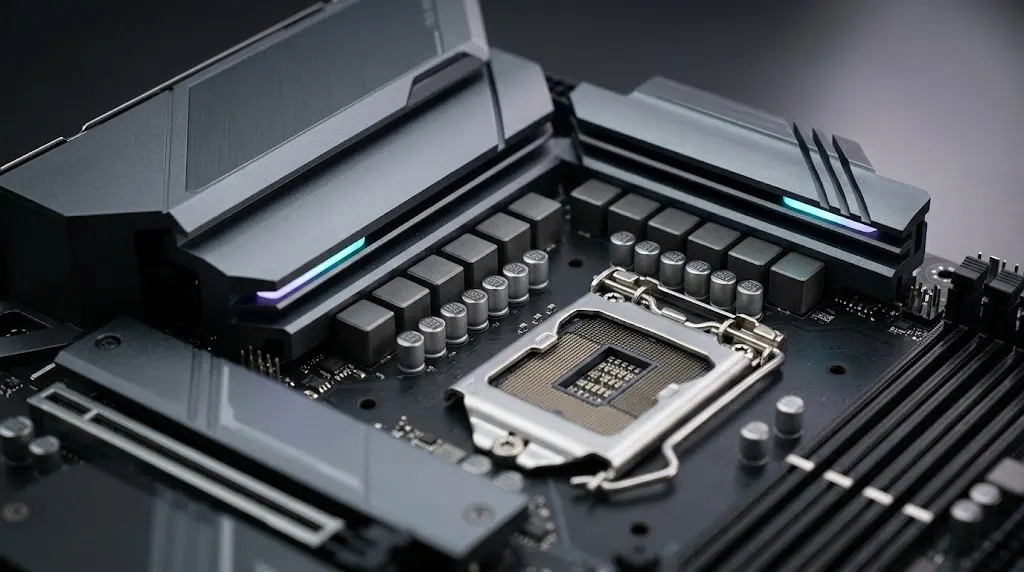
A VRM (Voltage Regulator Module) is part of a motherboard’s power-delivery system. It regulates the voltage supplied to the CPU so the processor can operate properly during everyday tasks, gaming, and demanding workloads.
Your power supply sends power to the motherboard, and the CPU’s VRM adjusts that power to meet the processor’s needs. When the CPU works harder, it may need more power. The VRM must handle this demand without overheating or affecting performance.
Do you need an expensive motherboard for a good VRM? Not always. The important thing is to choose a motherboard that can handle your CPU properly.
This guide explains how a motherboard VRM works, what VRM phases mean, how to check for overheating, and how to choose the right motherboard for your CPU.
Quick Answer: What Is VRM on a Motherboard?
A VRM (Voltage Regulator Module) on a motherboard is a power-delivery circuit that regulates the voltage supplied to the CPU. It converts incoming power into the lower, controlled voltage the processor needs to operate reliably. The motherboard VRM also responds to changing CPU power demands, helping maintain stable power during everyday computing, gaming, and demanding workloads.
In simple terms, VRM means Voltage Regulator Module. It is an important part of a motherboard’s power-delivery system, but a higher VRM phase count does not automatically mean better performance.
What Does a Motherboard VRM Actually Do?
A motherboard’s CPU VRM regulates the power supplied to the processor. It converts the incoming power into a lower, controlled voltage and adjusts its output as the CPU’s power demand changes.
A properly designed VRM helps the processor receive the power it needs during everyday tasks and sustained workloads. If the power-delivery system reaches its electrical or thermal limits, it may contribute to instability or reduced performance.
However, crashes and slowdowns do not automatically indicate a VRM problem. CPU overheating, RAM errors, PSU faults, BIOS settings, and software issues can cause similar symptoms. Check the evidence before blaming the motherboard’s VRM.
Where Is the VRM Located on a Motherboard?
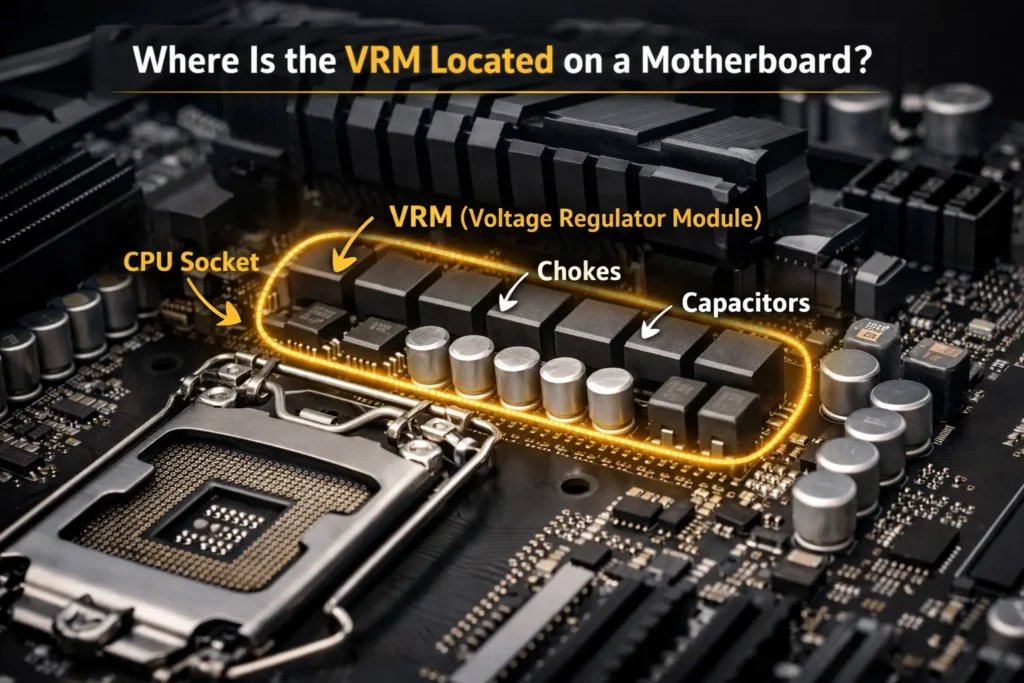
On most desktop motherboards, the CPU VRM is located around the CPU socket. You will often see metal heatsinks above or to the left of the socket. Some of the power-delivery components sit underneath these heatsinks.
To find the VRM on your motherboard:
- Identify the exact motherboard model.
- Open its official manual and locate the CPU socket.
- Look for the heatsinks surrounding the socket.
- Check the manufacturer’s specifications for information about the power-delivery design.
The layout varies between boards, so do not assume every motherboard places its components in exactly the same position.
Avoid removing VRM heatsinks just to inspect the components unless you know how to reinstall them correctly. Thermal pads can shift or become damaged, which may affect heat transfer.
For a broader explanation of motherboard components, see our guide to what a motherboard does and how its components work.
Main Components of a Motherboard VRM
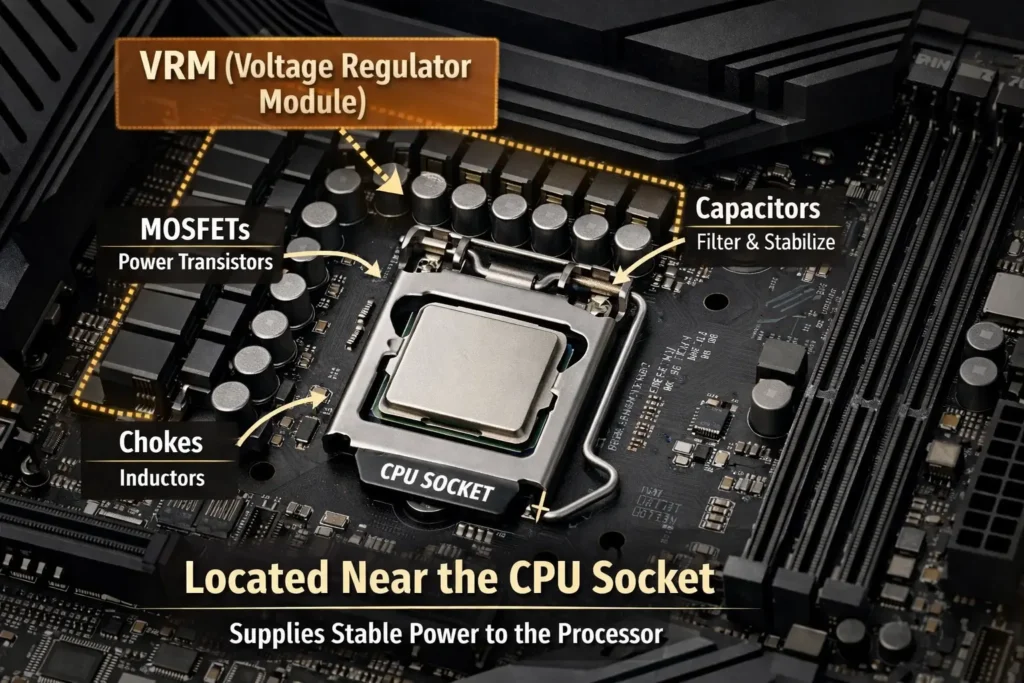
A VRM is not a single chip. It is a group of components that work together to regulate power. The exact design depends on the motherboard.
| Component | What it does |
|---|---|
| MOSFETs or power stages | Switch electrical power as part of the voltage-conversion circuit. |
| Chokes or inductors | Store and transfer energy during switching and help smooth current. |
| Capacitors | Help filter voltage fluctuations and support changing power demand. |
| PWM controller | Coordinates switching to regulate the output. |
| VRM heatsinks | Help remove heat from power-delivery components. |
These components work as a system. A MOSFET does not independently turn 12V into CPU voltage; voltage conversion and regulation happen through the combined switching and filtering circuit.
Why Do VRM Components Get Hot?
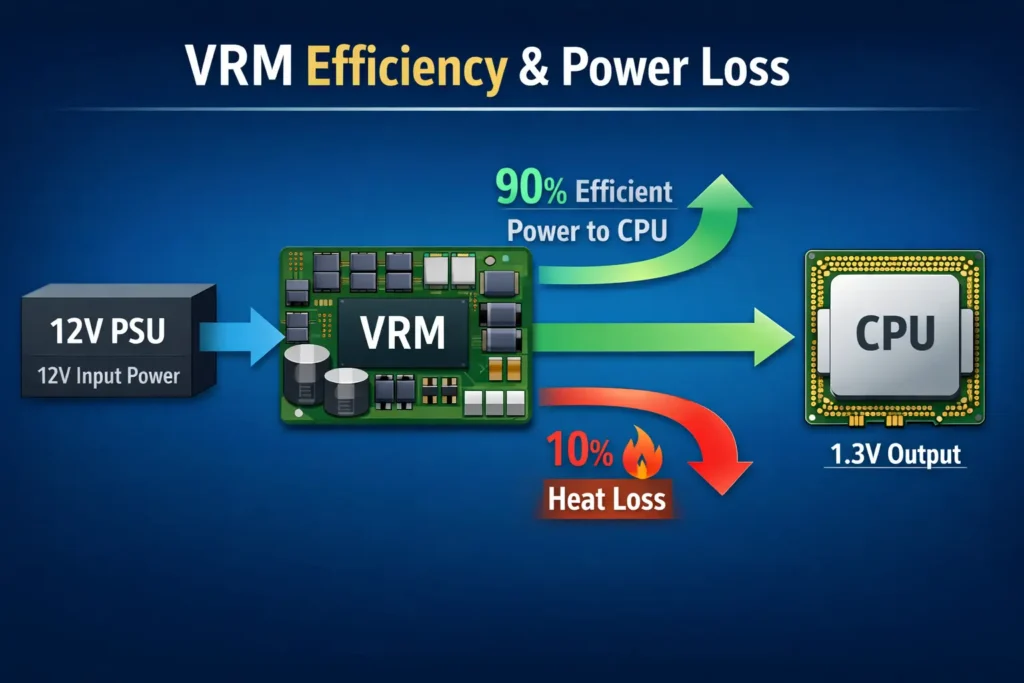
Some energy is lost as heat during power conversion. The amount depends on the design, electrical load, and operating conditions.
VRM temperatures may rise when:
- The CPU draws high current for a sustained period.
- The motherboard has limited VRM cooling.
- Airflow around the CPU socket is poor.
- Room temperature is high.
- Overclocking or increased power limits raise the processor’s power demand.
A warm VRM is not automatically a faulty VRM. The relevant question is whether the components remain within their operating limits and the motherboard can deliver the required power reliably.
How Does a VRM Convert 12V Power Into CPU Voltage?
The process is easier to understand in a few steps.
- Power enters the motherboard. The PSU supplies power through the appropriate connections, including the CPU power connector.
- The controller manages switching. The VRM controller coordinates the switching components according to the power-delivery requirements.
- The switching circuit converts the power. MOSFETs or integrated power stages switch rapidly as part of the voltage-regulation process.
- Inductors and capacitors filter the output. These components help produce a controlled voltage with acceptable fluctuations.
- Regulated power reaches the CPU. The circuit responds as processor demand changes.
A VRM must do more than provide a particular voltage. It also needs to handle current, respond to changes in demand, manage electrical losses, and dissipate heat.
For additional technical detail, see Intel’s Voltage Regulator-Down 11.1 Processor Power Delivery Design Guidelines. This document covers an older processor generation, so its specific design requirements should not be treated as universal specifications for modern motherboards.
What Do 8+2, 12+1, and 16+2 VRM Phases Mean?
Motherboard specifications often advertise configurations such as 8+2, 12+1, or 16+2. These figures describe groups within the power-delivery design, but their exact meaning depends on the motherboard.
The first number commonly refers to the CPU core power-delivery arrangement. The additional number may represent other power rails, such as SoC power on some platforms. The exact configuration varies by motherboard, so check the manufacturer’s specifications rather than assuming every board uses the same layout.
How Many VRM Phases Do You Need, and Does More Mean Better Performance?
There is no single VRM phase count that is best for every CPU. A higher phase count can help distribute current, but it does not automatically mean better power delivery or higher performance.
The quality of the power stages, controller design, cooling, and overall circuit implementation also matters. A motherboard with fewer phases may handle a particular CPU well, while another with a higher advertised count may perform less effectively under sustained load.
Before choosing a motherboard, check:
- CPU power requirements: Match the board to your exact processor.
- Workload: Consider whether you mainly browse and game or run long rendering and other heavy workloads.
- Cooling and testing: Look for effective VRM heatsinks and independent reviews with sustained-load temperature results.
- Compatibility: Confirm official CPU support and any required BIOS version.
Do not choose a motherboard by phase count alone. The complete power-delivery design and independent test results are more useful indicators.
What Are VRM Doublers and Teamed Power Stages?
A motherboard’s advertised VRM phase count does not always represent the number of independently controlled phases. Some designs use phase doublers, while others use teamed power stages to distribute current across multiple components.
VRM doublers take a controller’s signal and use it to drive additional power stages in a staggered sequence. This can increase the number of switching stages, although the timing and control behaviour differ from a design with the same number of independently controlled phases.
Teamed power stages allow multiple power stages to operate together under a shared control signal. This arrangement can help distribute current and support high CPU power demands without using a separate doubler for every stage.
Neither design is automatically better in every situation. Overall performance depends on the controller, power stages, cooling, current capacity, and implementation. When comparing motherboards, check the manufacturer’s specifications and independent VRM testing rather than judging power delivery by the advertised phase count alone.
What Is a Safe VRM Temperature?
There is no single temperature range that applies to every motherboard VRM. Different power stages, sensors, and designs have different operating limits.
Monitoring software can also report temperatures from different locations. A reading labelled “VRM MOS” may not measure the same point as one labelled “VRM” or “MOS.”
Rather than relying on a generic temperature chart, use these checks:
- Identify the sensor: Confirm what the monitoring software is measuring.
- Check the specifications: Look for relevant component limits or manufacturer guidance.
- Test under load: Observe temperatures during a repeatable workload, not just at idle.
- Watch performance: Check for unexpected clock or power reductions as temperatures rise.
- Compare similar tests: Independent reviews are useful when they explain their testing conditions.
Do not label a temperature safe or dangerous based only on a generic number without knowing the sensor and component limits.
How Can You Check VRM Temperature?
HWiNFO may display VRM or MOS temperature sensors if your motherboard exposes them. Some motherboard manufacturers also provide their own monitoring utilities.
If no VRM temperature sensor is available, do not assume the VRM is overheating simply because the CPU temperature is high. Look for other evidence, such as unexpected performance drops during sustained workloads, and consult reliable motherboard testing or technical support.
For general processor monitoring, see our guide on how to check CPU health.
Real-World Example: VRM Temperature Testing
Independent motherboard reviews can help you evaluate VRM cooling under sustained CPU workloads. For example, Tom’s Hardware tested the MSI MAG X870E Tomahawk WiFi motherboard with an AMD Ryzen 9 9900X using AIDA64’s System Stability Test.
During testing, the CPU averaged approximately 155W of power consumption. The review recorded peak VRM temperatures of around 55°C on external sensors and 60°C on the motherboard’s internal sensor. Tom’s Hardware reported that these temperatures were within the components’ operating specifications.
These results show how a particular motherboard’s power-delivery system performed under the reviewer’s test conditions. They do not establish a universal safe VRM temperature or guarantee the same results on other motherboards.
Actual temperatures depend on the VRM design, CPU power consumption, ambient temperature, case airflow, workload, and sensor location. When comparing motherboards, consult independent reviews that explain their testing methods and report VRM temperatures alongside sustained CPU performance.
For the original measurements and testing methodology, read Tom’s Hardware’s MSI MAG X870E Tomahawk WiFi review.
Can a Weak VRM Cause CPU Throttling?
Yes. If a VRM reaches its thermal or current-delivery limits, the motherboard may reduce power or performance to protect the system. However, VRM problems are only one possible cause of CPU throttling.
Other causes include:
- High CPU temperature.
- CPU power limits.
- Current or electrical-design limits.
- BIOS settings and power-management behaviour.
- Cooling limitations.
If performance drops during gaming or rendering, check CPU temperature, clock speed, package power, and any available throttling indicators. See whether the problem occurs only during sustained workloads, then compare your results with the CPU and motherboard specifications.
Do not increase CPU voltage or power limits just to eliminate throttling. Those changes can increase heat and electrical stress.
Our guide to CPU thermal throttling and its causes explains the issue in more detail.
Does VRM Quality Affect Gaming Performance?
VRM quality does not directly increase gaming FPS. If your motherboard already supplies enough power to your CPU, upgrading to a more expensive board may make little or no difference to frame rates.
However, if the motherboard’s power-delivery limits reduce CPU performance during sustained gaming, a better-matched board may help the processor maintain its intended performance. The actual result depends on the CPU, game, cooling, and motherboard settings.
When comparing motherboards for gaming, look for independent performance tests rather than assuming that a higher phase count means more FPS.
How Does the PSU Affect the VRM?
The power supply and VRM perform different jobs. The PSU supplies power to the computer, while the VRM regulates power for the CPU.
A faulty or inadequate PSU can cause instability, but a high-wattage PSU does not automatically improve a motherboard’s VRM. Similarly, a good VRM cannot compensate for every fault in the power supply.
Choose a reliable PSU with suitable capacity and the correct connectors for your hardware. If you suspect a power problem, check the PSU and its connections before changing VRM settings.
Also, never confuse the CPU power connector with the GPU power connector. They may look similar, but their pinouts and intended uses differ. Use only the cables approved for your PSU and components.
What Is Load-Line Calibration (LLC)?
Load-Line Calibration, or LLC, is a BIOS setting that changes how CPU voltage responds to load. Voltage may drop as current demand rises; this behaviour is commonly called voltage droop or Vdroop.
LLC changes that response, but more aggressive settings are not automatically better. Depending on the motherboard and setting, excessive LLC can cause voltage overshoot or increase electrical and thermal stress.
For everyday use, the sensible starting point is usually the default or manufacturer-recommended configuration. Change LLC only if you understand the board’s behaviour and can test stability carefully.
CPU voltage adjustments can also affect power consumption, temperatures, and stability. Learn more in our guide on whether undervolting a CPU decreases performance.
How to Choose a Motherboard VRM for Your CPU
You do not need an expensive motherboard with a high-end VRM for every PC build. The right choice depends on your processor, workload, and how long the CPU needs to run under heavy load.
Before choosing a motherboard, consider these factors:
- CPU compatibility: Check the motherboard manufacturer’s CPU support list and required BIOS version for your exact processor.
- Power delivery and cooling: Make sure the VRM design and heatsinks are suitable for your CPU’s power requirements, especially if you run demanding workloads for extended periods.
- Independent testing: Look for motherboard reviews that measure VRM temperatures and CPU performance under sustained loads. These results are more useful than phase counts alone.
- Your intended use: Everyday browsing and gaming do not necessarily require the same power-delivery capability as prolonged rendering or other CPU-intensive work.
A motherboard that handles one processor well may not be the best choice for a higher-power CPU. Even without overclocking, check that the board can support your processor reliably at its intended power settings.
If you plan to upgrade your CPU, confirm compatibility and BIOS requirements before buying. Our guide on whether you can update BIOS without a CPU explains why this feature depends on the motherboard.
Frequently Asked Questions
What does VRM stand for on a motherboard?
VRM stands for Voltage Regulator Module. It regulates power delivered to the CPU and other motherboard circuits.
Where is the VRM located?
It is usually near the CPU socket, often underneath heatsinks. Check your motherboard manual for the exact layout.
Is a higher VRM phase count always better?
No. Phase count is only one factor. Power-stage quality, controller design, cooling, and independent testing also matter.
Can a VRM overheat?
Yes. Heavy current demand, limited cooling, and poor airflow can raise VRM temperatures. Acceptable limits depend on the components and motherboard design.
Does a better VRM increase FPS?
Not by itself. It may help maintain CPU performance if an inadequate VRM was limiting the processor.
Do I need a high-end VRM for normal use?
Not necessarily. A suitable motherboard can handle everyday tasks without an expensive VRM. Match the board to your CPU and workload.
Should I upgrade my motherboard for a better VRM?
Only if your current board cannot adequately support your processor or workload, or you need other motherboard features. Check the evidence before upgrading.
Final Thoughts: What Is VRM on a Motherboard?
A motherboard’s VRM is an important part of CPU power delivery, but choosing the right one does not have to be complicated. You do not need the highest advertised phase count or the most expensive motherboard for every build.
Start with your exact processor, check the motherboard’s compatibility and power-delivery design, and look for independent testing under sustained workloads. These checks tell you more than marketing numbers alone.
If you are choosing a motherboard for a new PC or CPU upgrade, focus on reliable power delivery, adequate cooling, and evidence from credible testing. That approach helps you choose a board that fits your needs without paying extra for features you may never use.
Sources and Further Reading
- Tom’s Hardware: MSI MAG X870E Tomahawk WiFi Review
- Tom’s Hardware: Motherboard VRM Thermal Testing
- Intel: Voltage Regulator-Down 11.1 Processor Power Delivery Design Guidelines
For motherboard-specific details, consult the manufacturer’s official manual and CPU support list for your motherboard model.