
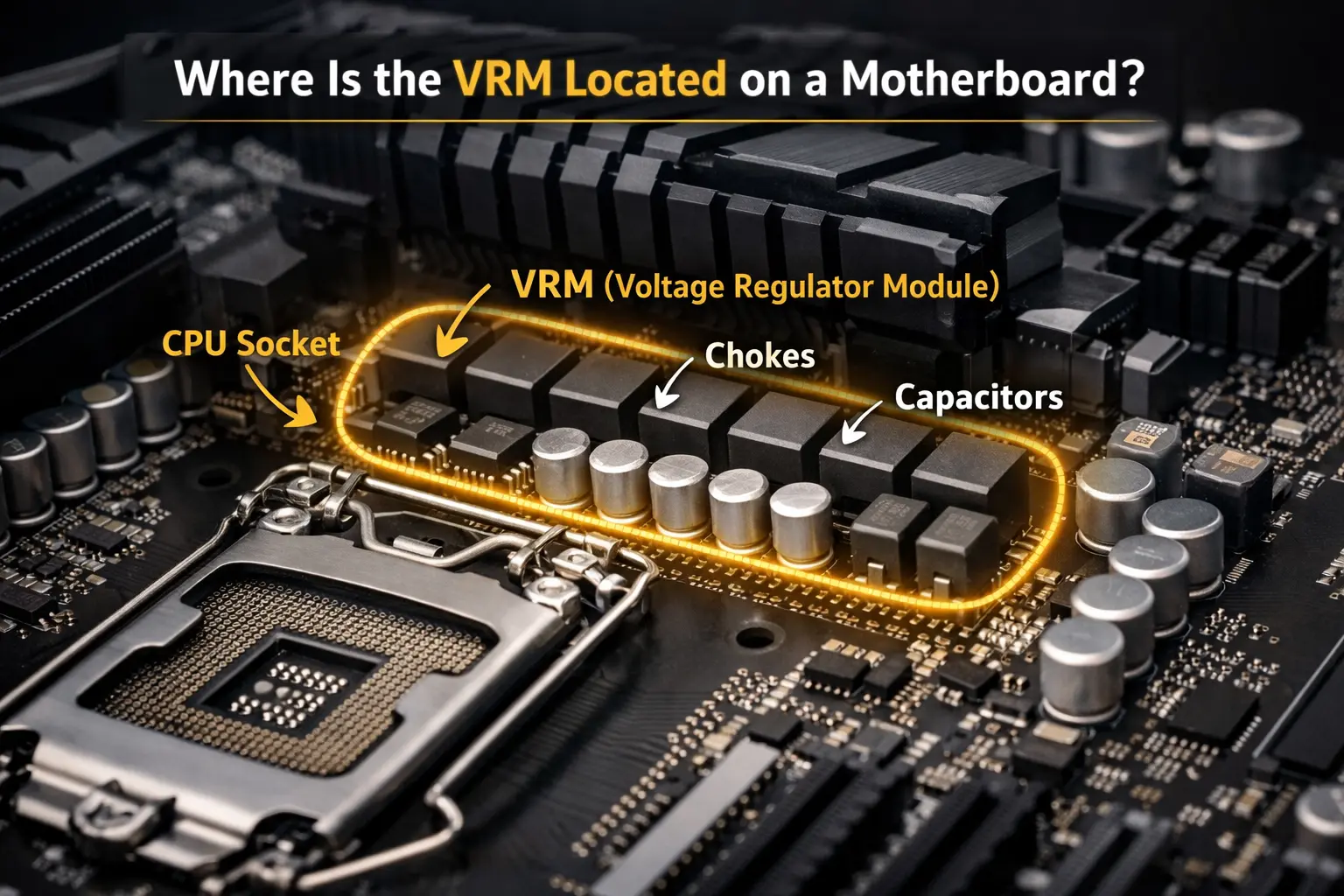
VRM (Voltage Regulator Module) on a motherboard converts power from the PSU into a stable voltage mainly for the CPU. It ensures smooth performance, prevents overheating, and supports overclocking. A high-quality VRM is key for gaming, workstations, and high-performance PCs.
In this guide, you will learn how a high-quality VRM ensures stable power delivery, reduces heat, and supports safe overclocking for your CPU, System RAM, and integrated graphics.
Understanding What Is VRM on a Motherboard?
Understanding VRM on a motherboard is simple. The VRM takes the 12-volt power supplied by the PSU and converts it into the much lower voltage required by the CPU. Modern processors typically operate between 1.0V and 1.4V, so the VRM must precisely regulate power to keep the system stable. Without proper voltage regulation, a CPU could overheat, crash, or suffer long-term damage.
For a detailed external explanation of VRM functions and components, see this guide at MakeUseOf.
VRM Full Form and Meaning in Simple Words
VRM Full Form: Voltage Regulator Module
- Meaning: VRM is a component on the motherboard that controls and delivers stable and regulated power to the CPU.
- Function: It converts high voltage from the power supply into safe, usable levels for your components.
- Importance: Good VRMs improve system stability, prevent overheating, and support overclocking, making them essential for high-performance PCs.
What Does a VRM Actually Do on a Motherboard?
A VRM (Voltage Regulator Module) plays a key role in managing your PC’s power. Here’s what it actually does:
- Regulates Power to the CPU
VRM converts high voltage from the power supply into safe, usable levels for your components.
- Ensures System Stability
A good VRM keeps your PC running smoothly and prevents unexpected crashes.
- Prevents Overheating
By controlling power flow efficiently, VRMs reduce heat and protect hardware.
- Supports Overclocking
High-quality VRMs allow your CPU or GPU to run faster safely, boosting performance.
- Protects Components
Stable power delivery protects sensitive components like the CPU from voltage spikes or instability.
Where Is the VRM Located on a Motherboard?
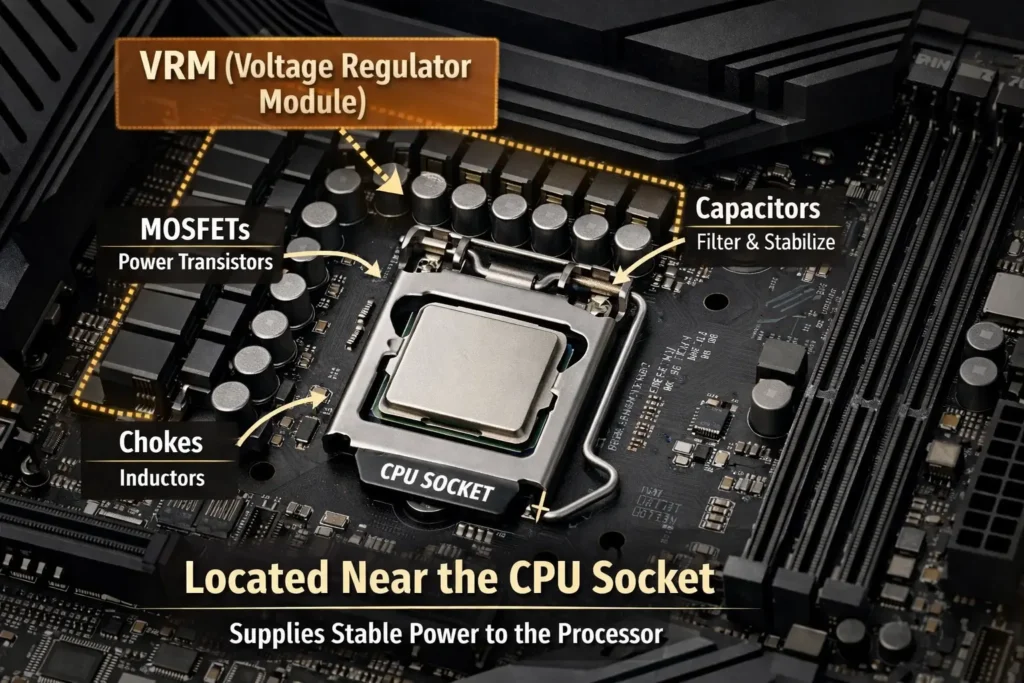
The VRM (Voltage Regulator Module) is usually located near the CPU socket on a motherboard. It consists of small chips, capacitors, and MOSFETs arranged around the CPU area. This placement allows it to deliver stable power directly to the processor, ensuring performance, stability, and safe overclocking.
VRMs are part of the motherboard’s overall power delivery system. If you want to understand how all components connect together, read our guide on What Is a Motherboard in a Computer.
Can a Weak VRM Cause Motherboard Problems?
Symptoms of a Weak VRM on a Motherboard:
- System Instability
Frequent crashes or random restarts during heavy tasks.
- Overheating
Components like CPU or VRM itself get unusually hot.
- Poor Overclocking Performance
CPU or GPU cannot reach higher speeds safely.
- Voltage Fluctuations
Unstable power can cause errors or component damage.
- Reduced Lifespan of Components
Excess stress and heat can shorten CPU, GPU, and motherboard life, which may make you wonder if it’s time to upgrade your CPU.
- Unexpected Shutdowns
PC may turn off under load due to inadequate power delivery.
Main Components of a Motherboard VRM Explained
A motherboard’s VRM (Voltage Regulator Module) is made up of several key components that work together to deliver stable power to the CPU and integrated graphics. Each part has a specific role in controlling voltage, reducing heat, and maintaining system stability. Understanding these components helps you know how VRMs affect performance and overclocking.
Main VRM Components:
- MOSFETs (Metal-Oxide-Semiconductor Field-Effect Transistors)
Switch power on and off to regulate voltage efficiently.
- Chokes (Inductors)
Smooth out the current and reduce electrical noise for stable power.
- Capacitors
Store and release energy to maintain steady voltage levels.
- PWM Controller (Pulse-Width Modulation Controller)
Manages the timing and strength of power delivery to components.
- Heat Sinks
Dissipate heat from VRM components to prevent overheating and maintain performance.
VRM Layout and PCB Design
The layout of VRM components and the motherboard PCB design plays a key role in power stability and cooling. Proper phase placement, component spacing, and multi-layer PCB design help distribute heat evenly and reduce voltage fluctuations. A well-designed VRM layout ensures safe overclocking, improved efficiency, and longer motherboard lifespan.
What Are MOSFETs in a VRM and Why Do They Heat Up?
MOSFETs (Metal-Oxide-Semiconductor Field-Effect Transistors) are essential components of a VRM on a motherboard. They act as electronic switches that control the flow of power from the PSU to the CPU. By turning on and off rapidly, MOSFETs regulate voltage precisely. However, this constant switching generates heat, which can rise quickly if the VRM is weak or under heavy load.
Why MOSFETs Heat Up:
- Power Switching: Rapid on/off cycles create energy loss as heat.
- High Current Flow: Delivering large currents to the CPU produces thermal energy.
- Insufficient Cooling: Weak or absent heat sinks increase temperature.
- Overclocking Load: Extra voltage demands generate more heat.
What Is the Role of Chokes and Capacitors in Power Delivery?
Chokes and capacitors are key VRM components that work together to deliver stable power to the CPU and other motherboard components. Both play different roles but ensure smooth voltage and system stability.
| Component | Role in Power Delivery | Key Benefit |
|---|---|---|
| Chokes | Smooth current and reduce electrical noise | Stable voltage |
| Capacitors | Store and release energy | Prevent voltage spikes |
What Is a PWM Controller in a Motherboard?
A PWM (Pulse-Width Modulation) controller is a key part of a motherboard’s VRM. It regulates the amount and timing of power delivered to the CPU and GPU by controlling the on/off cycles of MOSFETs. This precise control ensures stable voltage, reduces heat, and allows safe overclocking. A high-quality PWM controller is essential for system reliability and consistent performance.
How VRM Converts 12V PSU Power to CPU Voltage
The VRM on a motherboard converts the 12V power from the PSU into the lower voltage required by the CPU. Here’s how it works:
- Input Power from PSU
The 12V power from the power supply enters the VRM circuit.
- PWM Controller Signals MOSFETs
The PWM controller rapidly switches MOSFETs on and off to regulate power flow.
- Voltage Reduction by MOSFETs
MOSFETs lower the voltage from 12V to the CPU’s required level.
- Smoothing by Chokes and Capacitors
Chokes reduce current spikes, and capacitors store and release energy to stabilize voltage.
- Stable Power Delivered to CPU
The CPU receives clean, precise voltage for smooth performance and safe overclocking.
What is Load Line Calibration (LLC)?
When a CPU goes from an idle state to a 100% load, the voltage naturally drops, a phenomenon known as Vdroop. High-quality VRMs work with a BIOS feature called LLC to compensate for this.
- Without LLC: A voltage drop can cause the system to crash during heavy gaming or rendering.
- With LLC: The VRM pushes slightly more power to maintain a flat, stable voltage curve, ensuring 100% system stability.
VRM Efficiency and Power Loss
VRM efficiency determines how much power is delivered to the CPU versus lost as heat. Higher efficiency means less energy wasted, lower temperatures, and reduced stress on components. Low-efficiency VRMs generate more heat, risk throttling, and may reduce motherboard lifespan. Choosing a motherboard with efficient VRMs ensures stable power and better overall system performance.
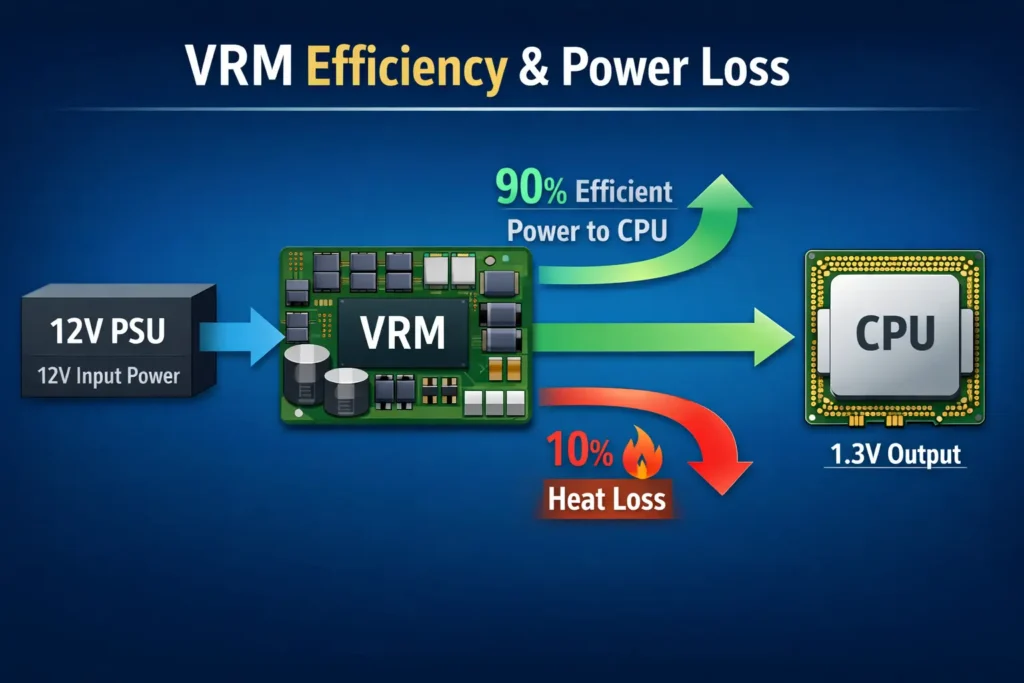
In real-world PC builds and stress testing, VRM quality often becomes visible during heavy CPU workloads. Systems with weak VRMs may experience higher temperatures, voltage drops, or performance throttling, which can affect your CPU’s operating temperature. Learn more about what constitutes a safe CPU temperature in our guide on Is 40°C Good for CPU?
Visual Idea:
- Infographic: “12V PSU → VRM → CPU”
- Show efficiency % and heat loss arrows.
Real-World Performance Example:
In stress tests, the ASUS ROG Crosshair X670E with 12+2 true-phase VRMs maintained stable 1.4V CPU voltage under 100% load, while the Gigabyte X670 Aorus Elite with 8+1 doubled-phase VRMs showed voltage dips of 0.05V under the same conditions. This can lead to throttling or instability during gaming or rendering.
Optional Visual:
Line graph showing CPU voltage vs load for two motherboards.
Bar chart for VRM temperature comparison under full CPU load.
PSU and VRM Interaction
The quality and amperage of your PSU directly affect VRM performance. A low-quality PSU can supply unstable current, causing VRM overheating, throttling, or system instability. High-quality PSUs provide clean, consistent power, allowing VRMs to deliver safe voltage to the CPU and GPU, especially during gaming or heavy workloads.
What Is Voltage Ripple and Why Is It Dangerous?
Voltage ripple is the small, unwanted fluctuation in the power delivered by a motherboard’s VRM to the CPU or GPU. Even minor variations can affect performance because components require stable, clean voltage. Excessive ripple can lead to instability, overheating, and long-term damage to sensitive parts.
Risks of Voltage Ripple:
- System Instability: Random crashes or freezes under load.
- Component Overheating: Extra electrical stress generates heat.
- Reduced Lifespan: CPUs, GPUs, and VRMs wear out faster.
- Overclocking Failures: Ripple prevents stable high-speed performance.
- Data Errors: Voltage fluctuations can cause computation errors or corruption.
How Do VRMs Keep Voltage Stable During Spikes?
VRMs ensure your CPU receives stable power during sudden workload spikes. Here’s how they handle it:
- Load Detection
The PWM controller senses an increase in CPU or GPU power demand.
- Instant Adjustment
MOSFETs switch rapidly to increase or decrease voltage output.
- Smoothing Power
Chokes and capacitors filter fluctuations, keeping voltage steady.
- Continuous Feedback
The VRM constantly monitors and fine-tunes voltage in real time.
- Stable Delivery
The CPU and GPU receive clean, stable voltage, preventing crashes or overheating.
What Do 8+2, 12+1, or 16+2 Power Phases Mean?
Power phases indicate how many VRM circuits deliver power to the CPU and other components. More phases provide smoother, more stable voltage, reduce heat per phase, and improve overclocking potential. The numbers show how power is split between CPU cores and other components like integrated graphics.
Power Phase Breakdown:
| Power Phase | Meaning | Benefit |
| 8+2 | 8 phases for CPU, 2 for GPU/others | Stable power, decent overclocking |
| 12+1 | 12 phases for CPU, 1 for GPU/others | Smoother voltage, better heat distribution |
| 16+2 | 16 phases for CPU, 2 for GPU/others | Maximum stability, ideal for high-end overclocking |
Does More VRM Phases Mean Better Performance?
Myth vs Reality of VRM Phases:
- Myth: More VRM phases always mean higher CPU performance.
Reality: Extra phases improve voltage stability and heat distribution but don’t directly increase base CPU speed.
- Myth: 16+2 VRMs are always better than 8+2.
Reality: Quality of components and cooling matter more than the number of phases alone.
- Myth: More phases guarantee better overclocking.
Reality: They help, but CPU limits, motherboard design, and thermal management are equally important.
True Phases vs Doubled Phases: What’s the Difference?
Motherboard VRMs can use either true phases or doubled phases to deliver power. True phases are actual independent circuits, while doubled phases share components to appear as more phases.
Understanding the difference helps evaluate stability, heat management, and overclocking potential.
| Feature | True Phases | Doubled Phases |
| Definition | Independent VRM circuits | Single circuits split to act as multiple phases |
| Voltage Stability | High, smooth delivery | Slightly less stable under heavy load |
| Heat Distribution | Spread evenly across phases | Can overload shared components |
| Overclocking Support | Excellent for high-end CPUs | Limited by component quality |
| Cost & Complexity | More expensive, complex design | Cheaper, simpler design |
Why Do VRMs Get So Hot During Gaming?
Causes of VRM Heat During Gaming:
- High CPU/GPU Load
Gaming demands more power, causing VRMs to work harder.
- Rapid Power Switching
MOSFETs constantly turn on/off to regulate voltage, generating heat.
- Insufficient Cooling
Weak or absent VRM heatsinks can’t dissipate heat effectively.
- Overclocking
Pushing CPU or GPU beyond stock speeds increases voltage and thermal load.
- High Ambient Temperature
Hot room or poor case airflow adds extra stress to VRMs.
Real-World VRM Temperatures During Gaming:
| Motherboard | VRM Temp (Full Load) | Notes |
| ASUS ROG Crosshair X670E | 65–70°C | High-quality heatsinks keep temps low |
| Gigabyte X670 Aorus Elite | 75–78°C | VRMs get hotter under heavy CPU load |
| MSI MPG X670 Carbon | 68–72°C | Good cooling, slightly lower temp than Gigabyte |
Pro Tip: Even the best VRMs run hot under heavy load. Proper case airflow, large heatsinks, and high-quality thermal pads can reduce VRM temperatures by 5 – 10°C, improving stability during long gaming sessions or overclocking.
What Is VRM Throttling and How to Detect It?
VRM Throttling Symptoms and Detection:
- Sudden CPU/GPU Slowdowns
Performance drops under heavy load due to VRM limiting power.
- Overheating VRMs
High VRM temperatures often trigger throttling to protect components.
- System Instability
Random freezes, crashes, or reboots may indicate throttling.
- Reduced Overclocking Potential
CPU or GPU cannot maintain higher speeds safely.
- Monitoring Tools Alerts
Software like HWInfo or motherboard apps can show VRM temperature spikes and power limits.
Safe VRM Temperature Range for Motherboards
VRMs generate heat while supplying power, but maintaining safe temperatures is critical for stability and longevity. Proper cooling prevents throttling, system crashes, and hardware damage.
| VRM Temperature (°C) | Status | Notes |
| 30–60°C | Ideal | VRM runs efficiently with minimal heat stress |
| 60–80°C | Safe | Normal under load; ensure airflow or heatsinks are adequate |
| 80–95°C | Warning | Risk of throttling; monitor cooling and workload |
| 95°C+ | Danger | VRM may overheat, causing instability or damage |
How Does VRM Quality Affect CPU Overclocking?
The quality of a motherboard’s VRM directly impacts CPU overclocking. High-quality VRMs deliver stable, clean power, reduce heat, and prevent voltage drops under heavy loads. Weak or low-quality VRMs can cause instability, crashes, or throttling when pushing the CPU beyond stock speeds. Choosing a motherboard with robust VRMs is essential for safe and effective overclocking.
Factors Affecting Overclocking:
- Number of VRM Phases
More phases spread the load and improve stability.
- Component Quality
Premium MOSFETs, chokes, and capacitors handle higher currents better.
- Cooling Efficiency
Heatsinks and airflow reduce VRM temperatures during heavy loads.
- PWM Controller Precision
Accurate voltage regulation ensures consistent CPU power delivery.
Does VRM Impact Gaming FPS?
VRMs do not directly increase gaming FPS, but they affect system stability and overclocking potential, which can influence performance. Weak VRMs may cause CPU throttling under heavy loads, reducing frame rates or causing stutters. High-quality VRMs keep voltage stable, allowing the CPU and GPU to maintain consistent performance during gaming.
Scenario Examples:
- Scenario 1: A motherboard with weak VRMs may throttle a high-end CPU in AAA games, causing FPS drops.
- Scenario 2: A motherboard with strong VRMs supports stable overclocking, maintaining higher and consistent FPS.
- Scenario 3: During extended gaming sessions, VRMs with poor cooling may overheat, leading to temporary stutters or crashes.
VRMs in Extreme Overclocking
In extreme overclocking setups, such as LN2 cooling or high-voltage CPU runs, VRM quality becomes critical. Weak VRMs can cause voltage drops, instability, or overheating, even if the CPU and cooling are top-notch. High-quality VRMs maintain stable power under extreme conditions, enabling safe, maximum overclocking potential for enthusiasts and competitive gamers.
Expert Tips for Choosing VRMs in Extreme Builds
For enthusiasts pushing their CPUs to the limits with extreme overclocking or LN2 cooling, VRM quality becomes crucial. Here’s what to look for:
- High-Phase VRMs: Motherboards with 12+2 or 16+2 true independent phases reduce voltage drops and maintain stable power under heavy load.
- Premium Components: Look for MOSFETs and capacitors rated for high current and thermal stress to handle extreme scenarios.
- Effective Cooling: Large VRM heatsinks and good case airflow help prevent overheating and throttling during extended sessions.
- Quality PSU Support: A reliable power supply with stable amperage ensures the VRM can deliver clean voltage safely.
Pro Tip: Even the best CPUs can throttle if VRMs are weak. Investing in a robust VRM setup guarantees stable voltage, maximum overclocking potential, and safer extreme performance.
Can a Weak VRM Limit a High-End CPU?
Yes, a weak VRM can bottleneck a high-end CPU. If the VRM cannot supply stable power, the CPU may throttle under load to protect itself, reducing performance and stability. High-quality VRMs are essential for maintaining consistent speeds, especially during heavy workloads or overclocking.
Example Case:
A high-end CPU like an Intel Core i9 on a motherboard with an 8+1 phase VRM may throttle during gaming or rendering, limiting its full potential. Upgrading to a motherboard with a 12+2 phase VRM allows the CPU to run at maximum stable speeds.
How to Test VRM Quality Before Buying a Motherboard?
When choosing a motherboard, VRM quality is crucial for stable performance and overclocking. Follow this checklist before buying:
Step-by-Step VRM Buying Checklist:
- Check VRM Phases
More phases (12+2, 16+2, etc…) generally provide smoother power delivery.
- Review Component Quality
Look for premium MOSFETs, chokes, and capacitors for better heat handling.
- Inspect Cooling Solution
Heatsinks or VRM cooling fins help prevent overheating during heavy loads.
- Read Reviews and Benchmarks
Look for motherboard tests under CPU load to see VRM performance and temperature.
- Consider PWM Controller Type
Digital controllers offer more precise and stable voltage regulation than analog ones.
- Compare VRM Layout
Spread-out and well-designed VRMs dissipate heat better and improve overclocking potential.
FAQs About What Is VRM on a Motherboard?
Can VRMs fail without warning?
Yes, poor-quality VRMs can fail suddenly, causing crashes or instability.
Are VRMs important for laptop motherboards?
Yes, they regulate CPU/GPU power and prevent throttling in laptops.
Can poor VRMs cause GPU instability?
Yes, unstable VRM power can affect GPU performance and stability.
Do all motherboards have the same VRM design?
No, VRM quality, phase count, and layout vary by motherboard model.
How do VRM heatsinks improve performance?
They dissipate heat, prevent throttling, and allow stable power delivery.
Conclusion: How to Choose the Right VRM for Your Build
A motherboard’s VRM plays a critical role in system stability, CPU performance, and safe overclocking. High-quality VRMs deliver clean and consistent power, reduce heat buildup, and prevent throttling during heavy workloads.
When choosing a motherboard for gaming, content creation, or workstation builds, always evaluate VRM quality, cooling design, and phase configuration. A reliable VRM ensures long-term stability, better performance, and safer operation for modern high-performance CPUs.