
Introduction
If you have ever built a PC, upgraded a CPU cooler, or checked high processor temperatures, you have probably heard about thermal paste. Although it is a small part of a computer, it plays a major role in keeping your CPU cool and running efficiently.
Without thermal paste, heat cannot transfer properly from the processor to the CPU cooler. This can lead to higher temperatures, reduced performance, thermal throttling, and even unexpected shutdowns during heavy workloads or gaming.
In this guide, you’ll learn what thermal paste is, why it is important, how it works, the different types available, where it is used, and how to apply and replace it correctly. Whether you’re building your first PC or maintaining an existing system, this guide will help you understand everything you need to know about thermal paste.
About This Guide
This guide is designed for beginners, PC builders, gamers, and anyone who wants to understand thermal paste. It explains the basics in simple language while also covering practical topics such as choosing the right type, applying it correctly, knowing when to replace it, and avoiding common mistakes. By the end of this guide, you’ll have the knowledge needed to keep your CPU cooling system working efficiently.
Quick Answer
Thermal paste is a heat-conductive compound applied between a CPU or GPU and its cooler to improve heat transfer. It fills tiny microscopic gaps that trap air, allowing heat to move more efficiently into the heatsink. This helps lower temperatures, prevent overheating, and maintain stable computer performance.
What Is Thermal Paste?
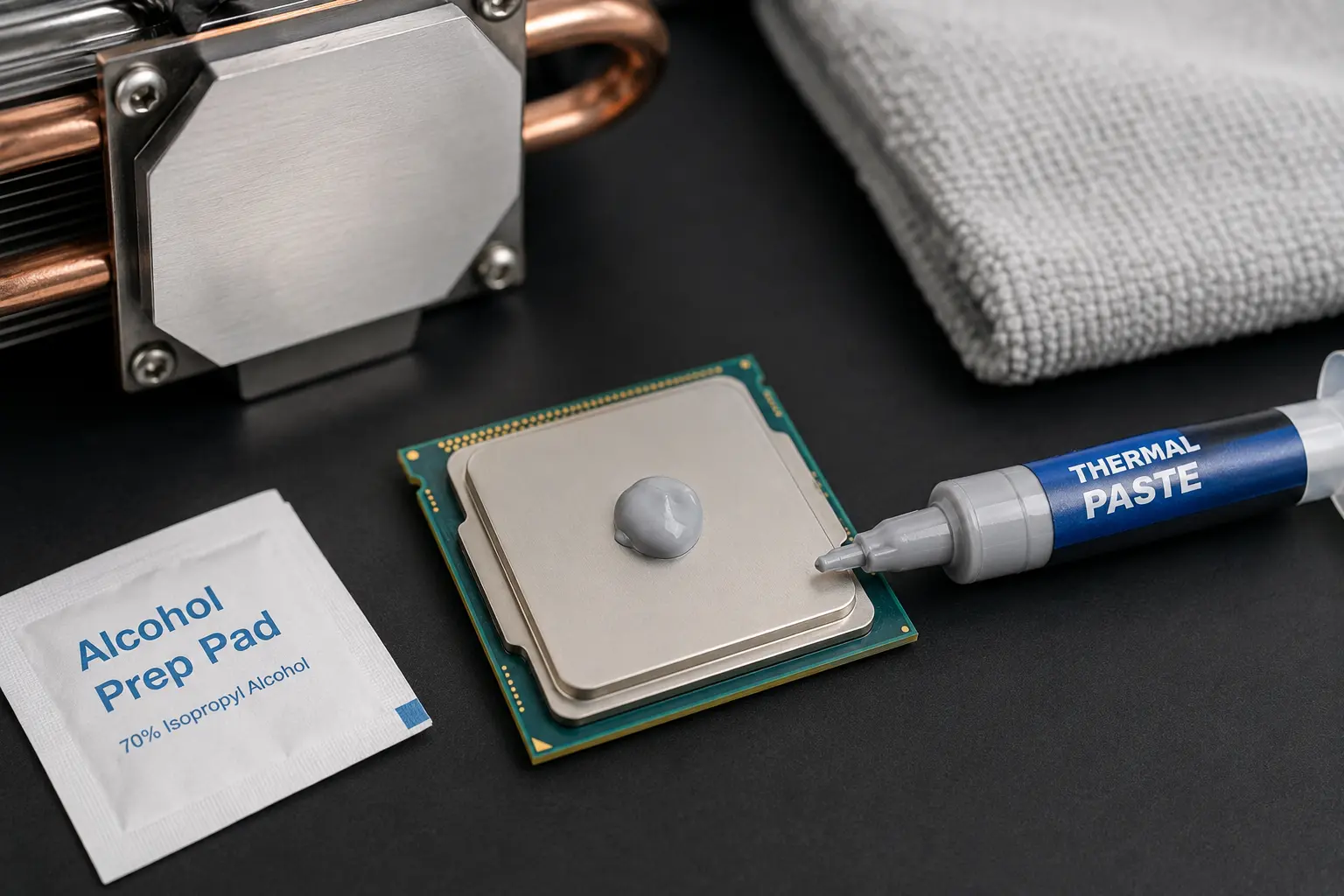
Thermal paste is a heat-conductive compound applied between a CPU (Central Processing Unit) or GPU (Graphics Processing Unit) and its cooler. It improves thermal conductivity by filling tiny microscopic gaps between the processor and the heatsink, allowing heat to move away more efficiently.
Although both metal surfaces appear smooth, they contain small imperfections that create air pockets. Because air is a poor conductor of heat, thermal paste fills these gaps to create better contact and improve cooling performance.
What Is the Purpose of Thermal Paste?
The primary purpose of thermal paste is to help transfer heat from the processor to the CPU cooler. Better heat transfer allows the cooling system to work efficiently and keeps the processor operating within safe temperature limits.
This is especially important during demanding tasks such as gaming, video editing, 3D rendering, and other heavy workloads that generate significant heat.
Why Is Thermal Paste Important?
Thermal paste helps maintain stable CPU temperatures and reliable system performance. Without it, heat cannot move efficiently from the processor to the cooler, causing temperatures to rise much faster.
Excessive heat may lead to thermal throttling, reduced performance, unexpected shutdowns, or long-term stress on computer components. Applying thermal paste correctly helps the cooling system perform as intended.
Where Does Thermal Paste Sit?
Thermal paste is applied between the top of the CPU (the Integrated Heat Spreader) and the base of the CPU cooler or heatsink before the cooler is installed.
Once the cooler is mounted, the pressure spreads the paste into a thin layer that creates better surface contact. This allows heat to transfer efficiently from the processor to the heatsink, where it is dissipated by the cooling system.
Important Safety Note: Apply thermal paste only between the CPU top surface and its cooler. Never apply it directly into the CPU socket, onto the motherboard, or on the processor pins/contacts.
How Does Thermal Paste Work?
When your CPU is running, it generates heat. That heat needs to move quickly to the CPU cooler so the processor can stay within a safe operating temperature.
Thermal paste forms a thin layer between the CPU and the heatsink. Once the cooler is installed, mounting pressure spreads the paste evenly, helping heat move more efficiently from the processor to the cooler.
Heat Transfer
The CPU transfers heat through the thermal paste to the heatsink. The heatsink then releases that heat with the help of a cooling fan or a liquid cooling system.
A smooth heat transfer path helps keep CPU temperatures under control, even during gaming or other demanding tasks.
Why Do Microscopic Air Gaps Matter?
Even smooth metal surfaces have tiny imperfections that reduce direct contact between the CPU and the cooler.
Thermal paste fills these small gaps, creating better surface contact and allowing heat to transfer more efficiently.
Thermal Conductivity
Thermal conductivity is a material’s ability to transfer heat. Thermal paste conducts heat much better than trapped air, making it an important part of an effective CPU cooling system.
Why Is Air a Poor Heat Conductor?
Air does not transfer heat efficiently. If air remains between the CPU and the cooler, it slows heat transfer and causes the processor to run hotter.
Thermal paste replaces these air pockets, helping the cooler remove heat more effectively.
Thermal Paste vs. No Thermal Paste
| Feature | Without Thermal Paste | With Thermal Paste |
| Surface Contact | Tiny air gaps remain | Better surface contact |
| Heat Transfer | Less efficient | More efficient |
| CPU Temperature | Higher | Lower |
| Cooling Performance | Reduced | Improved |
| System Stability | Greater chance of thermal throttling | More stable under load |
Key Takeaway: Thermal paste does not cool the CPU by itself. Its job is to improve heat transfer between the processor and the cooler, allowing the cooling system to work more efficiently.
What Is Thermal Paste Made Of?
Thermal paste is made from a base compound mixed with heat-conductive materials. The ingredients vary by manufacturer, but each type is designed to improve heat transfer between the CPU and its cooler.
- Silicone
Silicone is the base material in many thermal pastes. It keeps the paste smooth, stable, and easy to apply. - Ceramic Particles
Ceramic compounds improve heat transfer while remaining electrically non-conductive, making them a safe choice for most users. - Carbon
Carbon particles provide reliable cooling performance and are also electrically non-conductive. - Metal Compounds
Metal-based compounds offer better heat transfer but may conduct electricity, so they require careful application. - Liquid Metal
Liquid metal delivers the highest cooling performance but is electrically conductive and intended for experienced users.
Different Types of Thermal Paste
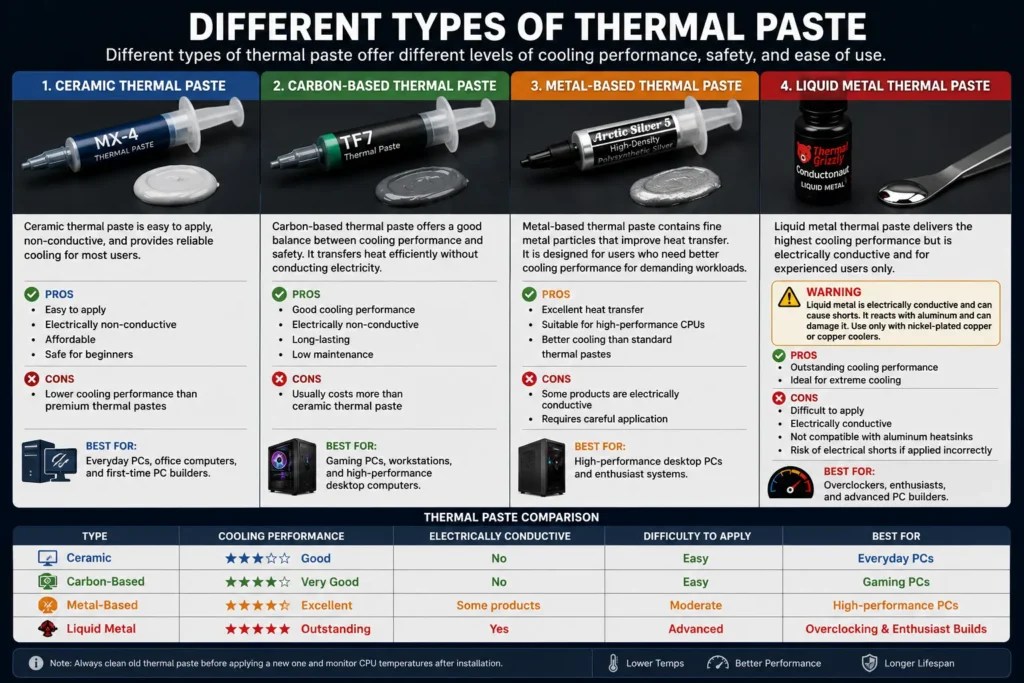
Different types of thermal paste offer different levels of cooling performance, safety, and ease of use. Choosing the right one depends on your computer, cooling needs, and experience level.
Ceramic Thermal Paste
Ceramic thermal paste is one of the most common choices for everyday computers. It is easy to apply, electrically non-conductive, and provides reliable cooling for most users.
Pros
- Easy to apply
- Electrically non-conductive
- Affordable
- Safe for beginners
Cons
- Lower cooling performance than premium thermal pastes
Best For: Everyday PCs, office computers, and first-time PC builders.
Carbon-Based Thermal Paste
Carbon-based thermal paste offers a good balance between cooling performance and safety. It is widely used in gaming PCs because it transfers heat efficiently without conducting electricity.
Pros
- Good cooling performance
- Electrically non-conductive
- Long-lasting
- Low maintenance
Cons
- Usually costs more than ceramic thermal paste
Best For: Gaming PCs, workstations, and high-performance desktop computers.
Metal-Based Thermal Paste
Metal-based thermal paste contains fine metal particles that improve heat transfer. It is designed for users who need better cooling performance for demanding workloads.
Pros
- Excellent heat transfer
- Suitable for high-performance CPUs
- Better cooling than standard thermal pastes
Cons
- Some products may conduct electricity
- Requires careful application
Best For: High-performance desktop PCs and enthusiast systems.
Liquid Metal Thermal Paste
Liquid metal thermal paste delivers the highest cooling performance of all thermal interface materials. However, it is electrically conductive and should only be used by experienced users.
Warning: Liquid metal reacts with aluminum heatsinks and can damage them. Use it only with nickel-plated copper or copper coolers.
Pros
- Outstanding cooling performance
- Ideal for extreme cooling
Cons
- Difficult to apply
- Electrically conductive
- Not compatible with aluminum heatsinks
Risks: Incorrect application can cause electrical shorts and damage surrounding components.
Best For: Overclockers, enthusiasts, and advanced PC builders.
Thermal Paste Comparison
| Type | Cooling Performance | Electrically Conductive | Difficulty | Best For |
| Ceramic | Good | No | Easy | Everyday PCs |
| Carbon-Based | Very Good | No | Easy | Gaming PCs |
| Metal-Based | Excellent | Some products | Moderate | High-performance PCs |
| Liquid Metal | Outstanding | Yes | Advanced | Overclocking and enthusiast builds |
Where Is Thermal Paste Used?
Thermal paste is used in devices where processors generate heat and require efficient cooling. Its main job is to improve heat transfer between the processor and the cooling solution.
CPU
Thermal paste is commonly applied between the CPU and the CPU cooler. It helps transfer heat away from the processor, allowing it to maintain safe operating temperatures.
GPU
Dedicated graphics cards also use thermal paste between the GPU and its heatsink. This helps keep GPU temperatures under control during gaming, video editing, and other graphics-intensive tasks.
Laptop Processors
Most laptops use thermal paste on the CPU and, in many cases, the GPU. Because laptops have compact cooling systems, efficient heat transfer is essential for stable performance.
Gaming Consoles
Modern gaming consoles, including PlayStation and Xbox systems, also rely on thermal paste to cool their processors. Replacing old or dried thermal paste can improve cooling performance in older consoles.
Note: Many stock CPU coolers and AIO liquid coolers come with thermal paste pre-applied. If the pre-applied paste is clean and unused, do not apply an additional layer of thermal paste.
Pro Tip: Laptops and gaming consoles have compact cooling systems. If you replace the thermal paste, apply only a small amount and make sure the cooler is installed evenly for the best cooling performance.
How to Apply Thermal Paste Correctly
Applying thermal paste correctly helps your CPU cooler transfer heat efficiently. Using the right amount and installing the cooler properly can improve cooling performance and help prevent overheating.
Step 1: Turn Off and Unplug Your PC
Shut down your computer, unplug the power cable, and allow the CPU to cool before opening the case.
Step 2: Remove the CPU Cooler
Carefully loosen the mounting screws or clips and lift the cooler straight up. If it feels stuck, gently twist it before removing it.
Step 3: Clean Old Thermal Paste
Remove the old thermal paste from both the CPU and the base of the cooler.
Use 90% or higher isopropyl alcohol and a lint-free or microfiber cloth. Avoid tissues or paper towels because they can leave fibers behind. Let both surfaces dry completely before applying new thermal paste.
Related Guide: Learn whether 70% isopropyl alcohol is safe in our guide, Can I Use 70 Alcohol to Clean CPU?
Step 4: Apply New Thermal Paste
Place a small amount of thermal paste in the center of the CPU. For most desktop processors, a pea-sized dot provides enough coverage.
Step 5: Reinstall the CPU Cooler
Place the cooler directly over the CPU and tighten the mounting screws evenly. The mounting pressure will spread the thermal paste into a thin, even layer.
Step 6: Check CPU Temperatures
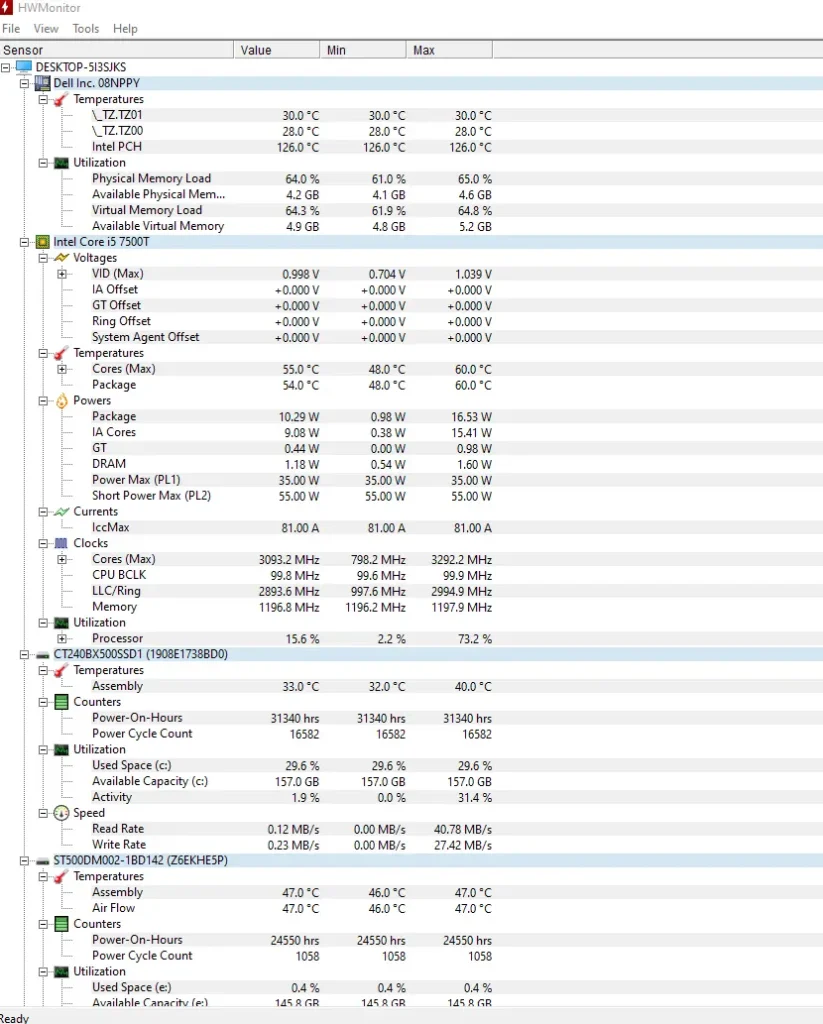
Turn on your computer and monitor the CPU temperature using a trusted hardware monitoring tool such as HWiNFO, HWMonitor, or Core Temp. Stable temperatures indicate that the thermal paste has been applied correctly.
How Much Thermal Paste Should You Use?
Using the correct amount of thermal paste is just as important as applying it correctly.
- Pea-Sized Dot (Recommended): The best choice for most desktop CPUs. It spreads evenly when the cooler is installed.
- Line Method: Sometimes used for larger processors, but it requires proper alignment.
- X-Pattern: Can improve coverage on some large CPUs, but it is generally unnecessary for standard desktop processors.
Recommendation: A pea-sized dot is the simplest and most widely recommended method for most Intel and AMD desktop CPUs.
Common Thermal Paste Application Mistakes
Avoid these common mistakes when applying thermal paste:
- Applying too much thermal paste
- Applying too little thermal paste
- Trapping air bubbles during installation
- Tightening the cooler unevenly
- Mixing old and new thermal paste
- Forgetting to remove the protective film from a new cooler (if present)
Tip: More thermal paste does not provide better cooling. A thin, even layer is all you need for efficient heat transfer.
Thermal Paste Lifespan & Maintenance
Thermal paste does not last forever. Over time, it can dry out, lose effectiveness, and reduce heat transfer. Regular maintenance helps keep your CPU running at safe temperatures and ensures the cooling system performs efficiently.
How Long Does Thermal Paste Last?
The lifespan of thermal paste depends on its quality, computer usage, and operating temperatures.
- Desktop PCs: Usually 3 – 5 years.
- Gaming PCs: Around 2 – 3 years, depending on workload and temperatures.
- Laptops: Usually 2 – 4 years, as compact cooling systems operate at higher temperatures.
High-quality thermal paste may last longer, while systems under heavy use may need replacement sooner.
When Should You Replace Thermal Paste?
Replace thermal paste whenever you remove the CPU cooler or notice higher-than-normal CPU temperatures.
It’s also a good idea to replace it if the paste has dried out or your computer has been in use for several years without maintenance.
Signs Your Thermal Paste Needs Replacing
Old or worn thermal paste can reduce cooling performance. Common signs include:
- Higher CPU temperatures than usual
- Frequent thermal throttling
- Loud or constantly running CPU fans
- Random shutdowns caused by overheating
If you notice these symptoms, check your processor temperatures before replacing the thermal paste.
Example: Replacing old or dried thermal paste can lower CPU temperatures by several degrees, depending on your CPU cooler, airflow, and workload.
Related Guides:
Can You Reuse Thermal Paste?
No. Once the CPU cooler has been removed, you should clean off the old thermal paste and apply a fresh layer.
Reusing old thermal paste can create uneven contact and reduce cooling efficiency.
Can Thermal Paste Expire?
Yes. Unopened thermal paste has a shelf life of about 2–5 years, depending on the manufacturer.
To extend its lifespan, keep the tube tightly sealed and store it in a cool, dry place away from direct sunlight. If the paste becomes dry, separated, or difficult to spread, it should be replaced.
What Happens If You Don’t Use Thermal Paste?
Using a CPU without thermal paste can cause serious cooling problems. Without it, heat cannot transfer efficiently from the processor to the CPU cooler, causing temperatures to rise quickly.
Common problems include:
- Overheating: The CPU reaches high temperatures much faster.
- Thermal Throttling: The processor automatically reduces its speed to prevent heat damage, which lowers performance. Learn more about high CPU usage and thermal throttling in our guide: Why Is My CPU Usage So High?
- Unexpected Shutdowns: The computer may shut down automatically to protect the CPU from excessive heat.
- Shorter CPU Lifespan: Running at high temperatures for long periods can place extra stress on the processor and other components.
Key Takeaway: Never install a CPU cooler without thermal paste. A small amount of properly applied thermal paste helps maintain safe temperatures and stable performance.
Thermal Paste vs. Thermal Pad
Both thermal paste and thermal pads improve heat transfer between computer components and their cooling solutions. However, they are designed for different purposes and should not always be used interchangeably.
Thermal Paste vs. Thermal Pad
| Feature | Thermal Paste | Thermal Pad |
| Material | Soft, heat-conductive compound | Pre-shaped heat-conductive pad |
| Cooling Performance | Better | Good |
| Application | Applied manually | Placed directly on the component |
| Reusability | No | Sometimes, if undamaged |
| Best Used For | CPUs and GPUs | VRMs, memory chips, SSDs, and other components |
When Should You Use Each?
Use thermal paste when:
- Installing or replacing a CPU cooler
- Reapplying paste to a CPU or GPU
- Maximum cooling performance is important
Use a thermal pad when:
- Cooling VRMs, memory chips, or M.2 SSDs
- The manufacturer originally used a thermal pad
- A fixed gap needs to be filled between a component and its heatsink
Key Takeaway: Thermal paste is the best choice for CPUs and GPUs because it provides better heat transfer. Thermal pads are better suited for VRMs, memory chips, SSDs, and other components where a pre-sized pad is required.
Best Practices for Using Thermal Paste
Following a few simple best practices can improve cooling performance and help your thermal paste last longer.
- Store it properly. Keep the tube tightly sealed and store it in a cool, dry place away from direct sunlight.
- Avoid touching the paste. Do not touch the thermal paste or the cleaned CPU surface with your fingers, as oils and dust can reduce heat transfer.
- Replace it when needed. Replace thermal paste every 2–5 years, or whenever you remove the CPU cooler.
- Choose a quality thermal paste. A reputable brand provides more reliable performance and longer-lasting results.
- Tighten the cooler evenly. Tighten the mounting screws in a crisscross pattern to apply even pressure and spread the thermal paste uniformly.
Best Practice: A small amount of quality thermal paste, applied correctly with even cooler pressure, provides the best cooling performance.
Frequently Asked Questions
Is Thermal Paste Really Necessary?
Yes. Thermal paste improves heat transfer between the CPU and the cooler. Without it, the processor can overheat, throttle performance, or shut down to protect itself.
How Often Should Thermal Paste Be Replaced?
Most desktop PCs need new thermal paste every 3 – 5 years, while gaming PCs and laptops may need replacement every 2 – 4 years. Replace it whenever you remove the CPU cooler.
Can Thermal Paste Dry Out?
Yes. Over time, thermal paste can dry out and lose its effectiveness. This may lead to higher CPU temperatures and reduced cooling performance.
Can You Use Too Much Thermal Paste?
Yes. Applying too much thermal paste can reduce cooling efficiency and create a messy installation. A pea-sized dot is enough for most desktop CPUs.
Is liquid Metal Better Than Regular Thermal Paste?
Yes, for cooling performance. However, liquid metal is electrically conductive and more difficult to apply. For most users, a quality thermal paste is the safer choice.
Does Thermal Paste Expire?
Yes. Unopened thermal paste usually has a shelf life of 2–5 years when stored properly. If it becomes dry, separated, or difficult to spread, it should be replaced.
Conclusion: What Is Thermal Paste?
Thermal paste is a small but essential part of every computer’s cooling system. It improves heat transfer between the CPU and the cooler, helping maintain safe temperatures and stable performance.
Choosing the right type of thermal paste depends on your computer, cooling needs, and experience level. For most users, ceramic or carbon-based thermal paste offers the best balance of performance, safety, and ease of application.
Applying thermal paste correctly is just as important as choosing the right product. Using the recommended amount, installing the cooler evenly, and replacing old thermal paste when needed can help your cooling system perform at its best.
To keep your computer running reliably, monitor your CPU temperatures regularly and maintain your cooling system by cleaning dust, checking cooler performance, and replacing thermal paste when it begins to lose its effectiveness.